Evaluating the Moirs Google Slide Template for Professional Presentations
Selecting the right presentation framework is a critical step in visual communication. For professionals, educators, and creatives researching design assets, the Moirs Google Slide Template represents a comprehensive solution designed to balance aesthetic flexibility with functional utility. This template system is structured around a substantial volume of content, offering 150 total slides distributed across five distinct premade color themes. When evaluating this asset for your next project, it is essential to look beyond the preview images and understand the structural mechanics, editing capabilities, and practical tradeoffs involved in integrating such a robust system into your workflow.
Understanding the Scope and Structure
The primary value proposition of the Moirs Google Slide Template lies in its modular architecture. Rather than providing a single linear deck, the package includes five separate PPTX files, each corresponding to a unique color variation. With 30 slides per template, users are presented with a wide array of layout options without being locked into a singular visual identity. This structure supports diverse use cases, allowing a user to maintain brand consistency across multiple presentations or to test different color psychologies for varied audiences.
For evaluators comparing this against lighter templates, the sheer volume of 150 slides suggests a focus on versatility over minimalism. The inclusion of widescreen formats ensures compatibility with modern display standards, while the provision of standard aspect ratios maintains backward compatibility. This dual-format approach reduces the friction often associated with adapting older templates to new hardware. Furthermore, the package includes a Readme file and direct download links for free fonts, addressing two common pain points in template adoption: technical setup and typography licensing.
Functional Benefits and Editing Capabilities
Aesthetics attract attention, but editability determines long-term utility. The Moirs template is built upon Master Slides, a foundational feature that distinguishes professional-grade templates from basic slide decks. This architecture allows for global changes; modifying a logo or footer on a master slide propagates the change across all relevant layouts, significantly reducing maintenance time for large decks.
The template emphasizes user autonomy through several key functional features:
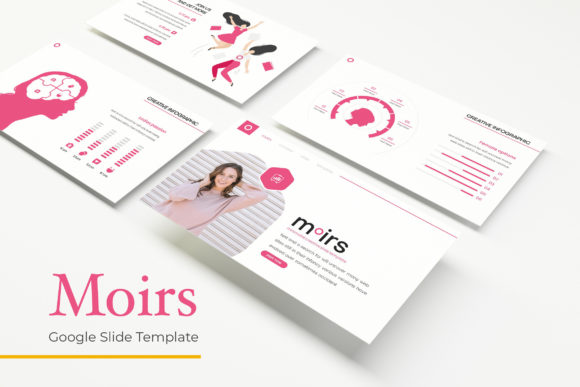
- Resizable and Editable Graphics: Unlike static images, the vector-based illustrations and infographics can be scaled without pixelation. This ensures that visuals remain crisp whether projected on a conference room screen or viewed on a mobile device.
- Drag-and-Drop Picture Placeholders: The integration of masked image frames streamlines the content population process. Users can replace stock photography with their own assets instantly, maintaining the intended composition and alignment without manual cropping.
- Handcrafted Infographics: Pre-designed data visualization slides reduce the cognitive load associated with chart creation. These are not generic clip art but are integrated into the slide masters to match the chosen color theme automatically.
- Pixel-Perfect Illustrations: High-fidelity graphical elements provide a polished look that typically requires custom illustration work, bridging the gap between template convenience and bespoke design.
These features collectively lower the barrier to entry for high-quality design. For teams without dedicated graphic designers, the ability to manipulate professional assets within a familiar PowerPoint or Google Slides interface is a significant operational advantage.
Strategic Fit: When Moirs Is the Right Choice
Determining whether the Moirs Google Slide Template aligns with your goals requires assessing your specific presentation needs. This asset is particularly well-suited for scenarios demanding variety and rapid iteration. Agencies managing multiple clients will benefit from the five distinct color variations, which allow for quick rebranding without purchasing separate templates. Similarly, corporate trainers and educators who require extensive slide libraries for different modules will find the 150-slide count sufficient to cover complex curricula without repetitive layouts.
The inclusion of specialized Section Break slides, Gallery layouts, and Portfolio slides indicates a strong fit for narrative-driven presentations. If your objective involves showcasing visual work, structuring long-form reports, or guiding an audience through distinct chapters of information, the pre-built transitional and showcase slides provide necessary pacing mechanisms. The handcrafted infographics further support data-heavy presentations, making this template viable for quarterly reviews, market research summaries, and educational lectures where visual data retention is paramount.
Tradeoffs and Considerations
While the feature set is extensive, potential users must weigh certain tradeoffs. The most immediate consideration is the exclusion of preview photography. All photographs used in the marketing materials are for illustration purposes only. Evaluators must budget time and resources for sourcing their own imagery. While the drag-and-drop placeholders simplify insertion, the absence of included stock photos means the final output relies heavily on the user's ability to source high-quality visuals that match the template’s premium aesthetic.
Additionally, the depth of the template introduces a learning curve. Navigating 150 slides and understanding the hierarchy of Master Slides requires an initial time investment. Users accustomed to simple, flat templates may find the layered structure overwhelming at first. While the Readme file mitigates this, teams should anticipate a brief onboarding period to fully leverage the master slide functionality and avoid breaking layout integrity during customization.
Licensing and font management also warrant attention. Although free font download links are provided, users must ensure they have the rights to use these typefaces in their specific commercial or public contexts. Relying on external font links also introduces a dependency; if a link breaks or a font is updated incompatibly, local backups become necessary. Prudent evaluation involves downloading and testing these assets immediately upon purchase to verify compatibility with your operating system and presentation software version.
Comparing Alternatives and Making a Decision
When comparing Moirs to alternative solutions, consider the ratio of content to cost and the required level of customization. Minimalist templates with fewer than 30 slides may be preferable for one-off pitches or simple updates where speed is prioritized over variety. Conversely, subscription-based design platforms might offer more frequent updates but lack the offline ownership and master slide control provided by a downloadable PPTX package.
If your decision hinges on long-term asset ownership and deep customization, Moirs offers a balanced middle ground. It provides the breadth of a premium suite with the accessibility of standard presentation software. However, if your primary need is automated design generation or collaborative real-time editing without file management, cloud-native AI tools may serve as better alternatives despite offering less granular control over master layouts.
Ultimately, the Moirs Google Slide Template serves users who view presentations as scalable assets rather than disposable documents. By offering 150 slides across five colorways with robust master slide architecture, it supports sustained professional use. Success with this template depends less on the asset itself and more on the user's willingness to engage with its structural features and supply complementary visual content. Evaluators should proceed if they value comprehensive layout variety and are prepared to invest the initial setup time required to maximize the template's editable infrastructure.