Examine: A Versatile Google Slides Template
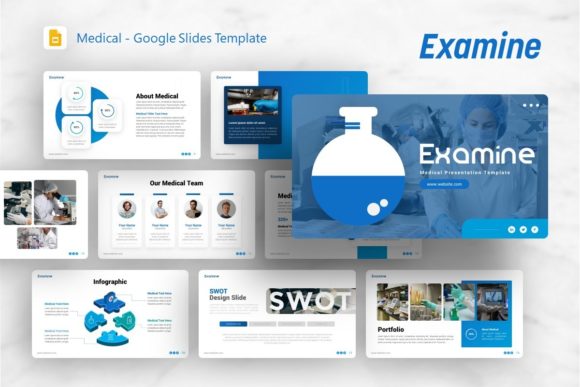
In the fast-paced world of digital communication, the difference between a forgettable presentation and a compelling narrative often lies in the visual framework. Professionals across industries understand that content is king, but design is the castle that protects and elevates it. The Google Slides Template - Examine arrives as a robust solution for those who need to bridge the gap between complex information and audience engagement. While originally conceptualized with medical and examination themes in mind, this template has evolved into a multi-purpose asset suitable for creative agencies, startups, corporate profiles, and personal portfolios. Its utility extends far beyond healthcare, offering a structured yet flexible canvas for anyone tasked with communicating ideas clearly and professionally.
Beyond Healthcare: A Multi-Purpose Design Asset
When you first encounter the Google Slides Template - Examine, the clean aesthetic suggests clinical precision. However, limiting its use strictly to medical presentations would be a missed opportunity. The design language employed here—characterized by ample whitespace, clear typography, and organized layouts—is universally applicable to professional storytelling. For a creative agency, the template provides a grid-based structure that allows portfolio pieces to breathe without competing with decorative elements. For a startup founder preparing a pitch deck, the pre-arranged flows help organize financial projections and market analysis into digestible segments.
This versatility stems from a neutral but sophisticated color palette and modular slide architecture. Whether you are a photographer showcasing a new collection or an educator explaining a complex syllabus, the template adapts to your content rather than forcing your content to adapt to the design. It serves as a foundational layer that establishes credibility immediately, allowing the presenter to focus on delivery and narrative refinement rather than pixel-pushing.
Technical Specifications and Customization Depth
A common frustration with free or low-cost presentation templates is the lack of true editability. Many look impressive in preview images but fall apart when users attempt to change colors or move elements. The Google Slides Template - Examine distinguishes itself through its technical construction. It includes 36 unique slides, providing enough variety to handle comprehensive reports without becoming repetitive. More importantly, these slides are built upon Master Slides. This is a critical feature for efficiency; changing a logo, font style, or primary color on the master slide automatically propagates that change across all relevant layouts, saving hours of manual formatting.
The template also features handcrafted infographics directly within PowerPoint. Unlike static images imported from external design software, these graphics are fully editable vector shapes. You can adjust data points, recolor segments to match your brand guidelines, and resize elements without losing quality. This pixel-perfect approach ensures that your charts and diagrams remain crisp on everything from laptop screens to large-format projection displays. Additionally, the inclusion of picture placeholders with drag-and-drop functionality streamlines the workflow for image-heavy presentations, making it accessible even for users with limited design experience.
Practical Applications Across Industries
Understanding where and how to deploy this template can maximize its return on investment. Here are several realistic scenarios where the Google Slides Template - Examine proves particularly effective:
- Corporate Business Reporting: Use the infographic slides to visualize quarterly growth or KPIs. The clean lines convey professionalism and attention to detail, which is essential when presenting to stakeholders or board members.
- Creative Portfolios: Photographers and designers can utilize the image-focused layouts to create a cohesive gallery view. The minimal background ensures that the artwork remains the focal point.
- Startup Pitch Decks: Investors appreciate clarity. The template’s structured approach helps founders present problem-solution narratives, business models, and team introductions in a logical sequence that reduces cognitive load.
- Educational Lectures: Teachers and trainers can leverage the varied layouts to break up long lectures. Alternating between text-heavy explanation slides and visual summary slides helps maintain student attention and improve information retention.
- Medical and Scientific Research: Returning to its roots, the template excels at displaying anatomical diagrams, research methodologies, and patient case studies with appropriate gravity and organization.
Enhancing Communication Through Visual Hierarchy
Effective presentation design is not merely about aesthetics; it is about cognitive psychology. The Google Slides Template - Examine utilizes strong visual hierarchy to guide the viewer’s eye. By establishing clear distinctions between headings, subheadings, body text, and visual elements, the template prevents the "wall of text" syndrome that plagues so many business presentations. When information is chunked effectively, audiences process it faster and retain it longer.
For professionals aged 20 to 50 who grew up in an increasingly visual digital landscape, this alignment with modern consumption habits is vital. We are accustomed to scanning interfaces and extracting value quickly. A presentation that respects this behavior by using consistent spacing, readable fonts, and intuitive navigation feels more respectful of the audience's time. This subtle psychological cue builds rapport before you even speak your first word.
Implementation Considerations and Best Practices
While the Google Slides Template - Examine is a powerful tool, getting the best results requires thoughtful implementation. Users should note that while the template files include vector icons and documentation, the specific photography seen in demo previews is not included. This is standard industry practice, but it means you must have your own high-quality assets ready. Using low-resolution or watermarked stock photos will undermine the premium feel of the template. Invest time in sourcing authentic imagery that aligns with your message.
Additionally, take advantage of the included documentation file. Even experienced PowerPoint users can benefit from reviewing the creator’s notes on how the master slides are organized. Understanding the underlying logic of the template prevents accidental layout breaks and unlocks hidden features. When customizing, resist the urge to use all 36 slides in every presentation. Select only the layouts that serve your specific narrative arc. A tighter, more focused deck is almost always superior to a comprehensive but bloated one.
File Compatibility and Workflow Integration
The package includes a .PPTX file, ensuring broad compatibility across Microsoft Office versions and seamless import into Google Slides. For teams collaborating remotely, this flexibility is non-negotiable. You can design locally in PowerPoint for advanced animation control, then upload to Google Drive for real-time team editing and commenting. The vector icons included are also a significant productivity booster, eliminating the need to search third-party icon libraries for basic symbols.
Ultimately, the value of the Google Slides Template - Examine lies in its ability to democratize high-end design. It removes the technical barriers that often prevent subject matter experts from creating visually compelling materials. By handling the heavy lifting of layout, typography, and color theory, it frees you to focus on what matters most: your expertise, your story, and your connection with the audience. Whether you are pitching a new venture, teaching a class, or reporting on annual performance, this template provides the professional scaffolding necessary to let your content shine.