Google Slides Template - Labora: A Practical Design Guide
In the fast-paced world of digital communication, the visual quality of a presentation often carries as much weight as the spoken narrative. For professionals ranging from startup founders to creative directors, finding a balance between aesthetic appeal and functional utility is a constant challenge. The Google Slides Template - Labora addresses this specific friction point by offering a structured yet flexible design system. Rather than forcing users into a rigid visual identity, Labora provides a foundational framework that supports diverse storytelling needs without requiring advanced graphic design skills. Understanding how to leverage this template effectively can transform a standard slide deck into a compelling communication asset.
Versatility Across Professional Contexts
One of the primary advantages of the Labora Business Presentation template is its adaptability. While many templates are niche-specific, Labora is engineered to serve multiple distinct purposes without losing coherence. This versatility is particularly valuable for freelancers and agency owners who manage various clients with different branding requirements. For example, a marketing consultant might use the clean, corporate layouts for a quarterly business review while utilizing the more dynamic, image-heavy slides for a creative portfolio showcase later in the same week.
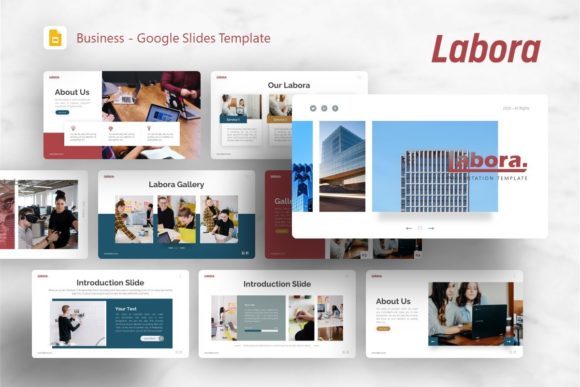
The template includes 36 unique slides, providing enough variety to construct comprehensive decks for company profiles, pitch decks, photography portfolios, and personal branding. This breadth ensures that users do not have to compromise on content flow due to a lack of appropriate slide formats. When preparing a startup pitch deck, for instance, having dedicated layouts for team introductions, market analysis, and financial projections allows the presenter to focus on data accuracy rather than formatting alignment. Similarly, photographers can utilize the full-bleed image placeholders to let their work speak for itself, ensuring the design enhances rather than distracts from the visual content.
Streamlining Workflow with Master Slides
Efficiency in presentation design often comes down to how well the underlying architecture supports editing. Labora is built upon Master Slides, a feature that significantly reduces the time spent on repetitive formatting tasks. Instead of adjusting fonts, colors, or logo placements on individual slides, users can make global changes at the master level that propagate throughout the entire deck. This is crucial for maintaining brand consistency, especially when collaborating with teams or updating older presentations with new corporate guidelines.
The inclusion of easy-to-customize contents means that text boxes and shapes are logically grouped and named. Users frequently encounter templates where elements are locked or layered confusingly, leading to frustration during tight deadlines. Labora avoids this pitfall by ensuring all graphics are resizable and editable. Whether you need to adjust an infographic to reflect updated statistics or resize a chart to fit additional commentary, the vector-based assets scale without pixelation. This technical reliability ensures that the presentation looks professional on any display, from laptop screens to large conference hall projectors.
Leveraging Handcrafted Infographics for Clarity
Data visualization is often the weakest link in business presentations. Generic charts can fail to engage audiences, while custom illustration requires resources many professionals lack. Labora bridges this gap with handcrafted infographics designed specifically within PowerPoint. These are not static images but fully editable vector elements. This distinction matters because it allows users to modify colors to match their brand palette and update data points directly within the slide environment.
For educators and trainers, these infographics serve as powerful cognitive aids. Complex processes or hierarchical structures can be broken down visually, improving retention and understanding. Because the illustrations are pixel-perfect and integrated natively, there is no need to export files from external design software and re-import them, which often breaks editability. This seamless integration supports a workflow where content evolution and visual refinement happen simultaneously, rather than sequentially.
Practical Considerations for Implementation
While the Google Slides Template - Labora offers significant benefits, users should approach implementation with realistic expectations regarding asset management. It is important to note that all images shown in the demo are for preview purposes only and are not included in the downloadable files. This is standard practice for template licensing, but it requires users to have their own high-quality imagery ready before beginning the design process. Relying on low-resolution stock photos or generic clip art can undermine the premium feel of the template structure.
Additionally, while the template is compatible with Google Slides, the source file is provided as a PowerPoint .PPTX format. Users intending to work exclusively in Google Slides should perform an initial import check to ensure all fonts render correctly and animations translate as expected. Some complex vector effects may require minor adjustments after conversion. Having the documentation file included in the package is essential here; it serves as a roadmap for troubleshooting and maximizing the template’s features. Reading this guide before starting can prevent common formatting issues and save hours of adjustment time.
Who Benefits Most from This Design System
The Labora template delivers the highest return on investment for users who present frequently but lack dedicated design support. Small business owners pitching to investors benefit from the polished, corporate-ready aesthetics that signal professionalism and attention to detail. Creative agencies appreciate the modular nature of the slides, which allows for rapid prototyping of client proposals without starting from scratch each time. Educators and speakers find value in the visual hierarchy that guides audience attention through dense information.
However, users seeking highly experimental or avant-garde layouts may find the structured nature of Labora somewhat constraining. The template excels at clarity and professional communication rather than artistic abstraction. It is best suited for scenarios where the goal is to convey information efficiently and persuasively. If your objective is to create a standardized, reusable presentation asset that maintains quality across dozens of iterations, Labora provides the necessary infrastructure. Conversely, if you require a one-off artistic installation piece, a blank canvas or specialized art-focused template might be more appropriate.
Maximizing Impact Through Strategic Customization
To truly capitalize on the Labora Business Presentation template, users should view it as a strategic tool rather than just a cosmetic overlay. Start by auditing your existing content against the available 36 slide layouts. Identify which narrative arcs align with the pre-designed structures. This reverse-engineering approach often reveals opportunities to tighten messaging or highlight data that was previously buried in bullet points.
Utilize the drag-and-drop picture placeholders to maintain visual rhythm. Consistent image sizing and placement create a subconscious sense of order for the viewer, making the content easier to digest. When customizing the color scheme, limit your palette to three or four core colors derived from your brand identity to avoid visual noise. The vector icons included in the files can be used to create a visual shorthand for recurring concepts, further speeding up audience comprehension.
Ultimately, the value of the Google Slides Template - Labora lies in its ability to democratize high-quality design. By handling the heavy lifting of layout, typography, and data visualization, it frees professionals to focus on what matters most: crafting a narrative that resonates. Whether you are securing funding, showcasing a portfolio, or training a team, the template provides a reliable vessel for your ideas. Success depends not just on downloading the file, but on thoughtfully adapting its robust features to serve your specific communication goals. With proper customization and high-quality assets, Labora transforms from a simple template into a cornerstone of your professional presentation toolkit.