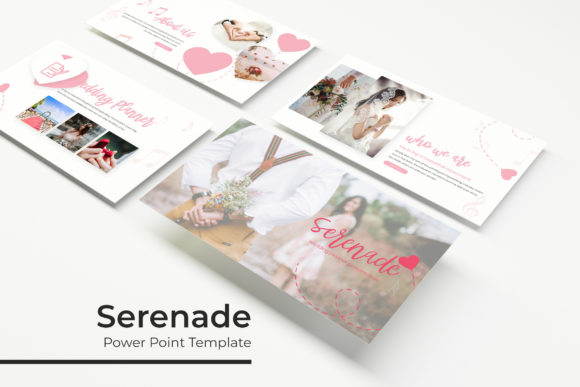
Serenade Power Point Template: Design Made Simple
Creating a presentation that feels both professional and visually engaging often requires hours of design work or an expensive agency retainer. The Serenade Power Point Template bridges this gap by offering a comprehensive suite of pre-designed assets that maintain high aesthetic standards without demanding advanced graphic design skills. For professionals, educators, and entrepreneurs, this template system serves as a foundational toolkit rather than just a collection of static slides. It addresses the common pain point of visual consistency, ensuring that your pitch decks, lectures, and reports look cohesive from the first slide to the last.
The core value of Serenade lies in its structural flexibility. Unlike basic themes that simply change fonts and background colors, this template is built on a robust master slide architecture. This means that when you adjust a color palette or update a logo placement, the changes propagate intelligently across your deck. This efficiency is critical for busy creators who need to iterate quickly based on stakeholder feedback or new data. Whether you are preparing a quarterly business review or a creative portfolio showcase, the underlying framework supports rapid customization while preserving pixel-perfect alignment.
Comprehensive Asset Library and Color Systems
Volume matters when you are building complex narratives, and Serenade provides substantial depth with 150 total slides distributed across five distinct premade color variations. Each color theme includes 30 unique slide layouts, preventing the repetitive look that often plagues template-based presentations. This variety allows you to match the visual tone to your specific brand identity or the emotional context of your message. A fintech startup might opt for the cooler, trust-evoking blue variation, while a lifestyle brand could leverage warmer tones to create intimacy and energy.
Beyond standard content slides, the inclusion of dedicated section break slides helps manage audience attention span. In longer presentations, these visual pauses act as cognitive resets, signaling a shift in topic and helping viewers retain information. The gallery and portfolio slides are particularly noteworthy for creative professionals. They are designed with resizable and editable picture placeholders that respect aspect ratios, allowing you to drag and drop images without distortion. This feature alone saves significant time during the revision process, as you avoid the tedious manual resizing that typically accompanies image updates in PowerPoint.
Handcrafted Infographics and Visual Data
Data visualization is often where presentations fail, but Serenade tackles this with handcrafted infographic elements integrated directly into PowerPoint. These are not flat JPEGs pasted onto a slide; they are fully editable vector graphics. You can modify chart values, adjust segment sizes, and recolor individual components to highlight specific metrics. This level of editability ensures that your data storytelling remains accurate and dynamic. If your Q3 revenue projections change an hour before a meeting, you can update the visual representation instantly without returning to external design software.
The illustrations included are pixel-perfect, meaning they remain crisp whether projected on a laptop screen or displayed on a large conference room monitor. This attention to detail extends to the typography and spacing, creating a polished user experience that reflects well on your personal or corporate brand. When audiences perceive high production value, they are subconsciously more likely to trust the content being presented. Serenade leverages this psychological principle by providing design quality that rivals custom agency work.
Practical Applications Across Industries
The versatility of the Serenade Power Point Template makes it applicable across a wide spectrum of use cases. For marketers and business owners, the template excels in pitch decks and investor updates where clarity and professionalism are paramount. The structured layouts guide the narrative flow, ensuring that key value propositions and financial highlights are presented logically. Educators and trainers benefit from the section breaks and infographic slides to break down complex concepts into digestible visual chunks, enhancing student retention and engagement.
Freelancers and agencies find particular value in the portfolio and gallery sections. These slides provide a clean, distraction-free environment to showcase case studies and creative work. Because the placeholders are drag-and-drop enabled, updating a portfolio with recent projects becomes a matter of minutes rather than hours. Bloggers and publishers can also repurpose these slides for social media carousels or webinar visuals, maximizing the return on investment from a single design asset. The widescreen format ensures compatibility with modern display standards, making it suitable for both live presentations and digital distribution.
Technical Specifications and Implementation
Understanding what is included in the package helps set realistic expectations for implementation. The Serenade download contains five PPTX files in standard format and five corresponding widescreen versions, covering all major presentation aspect ratios. A readme file is included to guide initial setup, along with direct download links for the free fonts used in the design. This transparency regarding typography prevents the common issue of missing fonts breaking your layout upon opening the file.
- 5 PPTX Files: Standard aspect ratio versions for legacy compatibility.
- 5 Widescreen PPTX Files: Optimized for modern monitors and projectors.
- Premade Colors: Five distinct palettes with 30 slides each.
- Font Resources: Links to free, commercial-use typography.
- Master Slide Architecture: Global editing capabilities for efficiency.
It is important to note a standard industry caveat: all photographs or pictures used in the preview are not included. They are intended solely for illustration purposes to demonstrate layout potential. Users must supply their own imagery, which actually encourages greater authenticity in the final presentation. Relying on stock photos from a template preview can sometimes make a deck feel generic; sourcing your own visuals ensures the presentation resonates specifically with your target audience.
Evaluating Fit for Your Workflow
When selecting a presentation template, consider your long-term workflow needs alongside immediate aesthetic preferences. Serenade is best suited for users who view PowerPoint as a primary communication tool rather than an afterthought. If you frequently update decks, require consistent branding across multiple presenters, or need to visualize data regularly, the master slide infrastructure and editable infographics offer tangible productivity gains. However, if you only create one-off slideshows annually, the depth of features may be more than necessary.
For those who do adopt Serenade, the learning curve is minimal due to the intuitive drag-and-drop mechanics. The true efficiency unlock comes from spending thirty minutes initially to customize the master slides with your brand colors and logos. Once this foundation is set, every subsequent presentation created with the template will automatically adhere to your brand guidelines. This reduces friction for teams where multiple stakeholders contribute to deck creation, ensuring that the final output always looks professionally curated regardless of who assembled the slides.
Ultimately, the Serenade Power Point Template represents a balance between creative freedom and structural discipline. It removes the blank canvas paralysis that stifles productivity while providing enough variety to prevent visual fatigue. By treating your presentation software as a strategic asset rather than a utility, you elevate the perceived value of your ideas. Whether communicating internal strategy, pitching external clients, or educating students, having a reliable, high-quality visual framework allows you to focus on what matters most: your message.